

Measure and Inspect - 5 of 13Updated 13 November 2026
Measure a Gap Between Two Parts
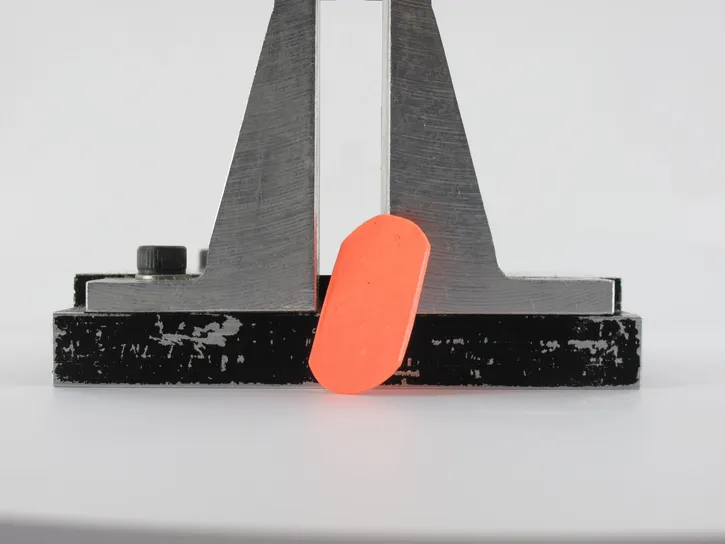
P51 SD is the product developed for clearance, spacing and air gap inspection. You place it between the two parts, let it cure, remove it and measure its thickness with a contact instrument.
It fits when the gap is at least 0.1 mm thick and the impression can come out without being bent. When it does not, the choice goes back to the selection criteria, namely the removal constraint, the final hardness and the way you measure.
Why P51 SD
- The Pasty consistency does not run, so the product stays where you place it on any control surface.
- Its Rigid hardness reaches 51 Shore D. As the hardest product of the range, it is recommended for contact measurement with a caliper, a micrometer or a coordinate measuring machine.
- The resolution is 1 µm and there is no dimensional shrinkage.
- This product accepts no removal constraint, so the impression must come out without being bent.
- It is not compatible with the Double Blade Cutter.
Step by Step

P51 SD hardens in 20 seconds at 23°C. Have the second part in hand before you extrude the product.
- Degrease both faces with DN1 and wipe them with a clean microfiber until dry.
- Extrude a test drop and check that its color is uniform.
- Place a bead of P51 SD on the face where you want to measure the gap.
- Bring the second part into its working position at once. The working time of P51 SD is only 20 seconds at 23°C.
- Wait 1 minute after mixing at 23°C, then separate the parts and remove the impression without bending it.
- Wait until polymerization is complete, 1 minute 30 seconds after mixing at 23°C.
- Measure the thickness of the impression at the point of interest with a contact instrument.

When P51 SD Does Not Fit
- The gap is thinner than 0.1 mm. P51 SD cannot be crushed further.
- The impression has to bend to come out, behind an undercut or in a groove. P51 SD accepts no removal constraint, so a more flexible product measured without contact may be needed.
- You want to slice the impression. P51 SD is not compatible with the Double Blade Cutter.
Run these cases through Select the Right Plastiform or the Plastiform Finder, or describe the assembly to our technical team.
Related Pages

Did this article answer your question?