

How-To Guides - 3 of 15Updated 13 November 2026
Mix the Components
Plastiform products polymerize only when base and catalyst are mixed in a 1:1 ratio. An uneven mix causes soft spots, streaks, or incomplete polymerization.
Cartridge Products
- Insert the cartridge into the dispensing gun of your choice.
- Remove the cartridge cap by turning it a quarter turn to the left.
- Attach the nozzle included with the cartridges. Align the notch and turn a quarter turn to the right to lock it.
- Clip the tip at the end of the nozzle if you need one. Tips only work with Fluid products.
- Squeeze the gun trigger until both components enter the nozzle and mix.
- Extrude a small drop onto a clean surface. The output must be a single uniform color. If you see streaks of white and color, continue extruding until the mix is homogeneous.
- Make your impression.
Manual Putty Products
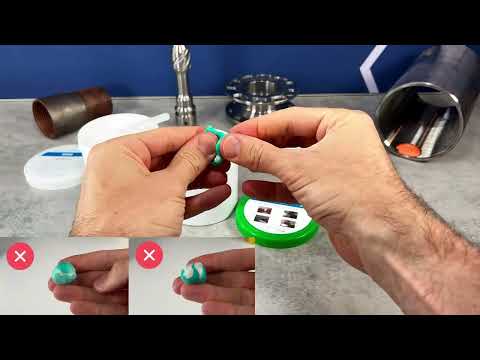
- Use the dedicated spoon for each component. Do not swap spoons between base and catalyst.
- Take visually equal volumes of each component (ratio 1:1).
- Mix with your fingertips for 20 seconds at most, until the color is completely uniform.
- Do not overmix. Excessive kneading heats the material and shortens working time.
XL Products in Bottles
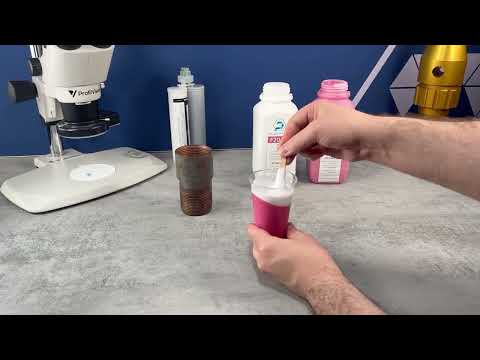
- Homogenize each component in its own container first. Mix and Pour XL Products gives the method for bottles and for cans.
- Measure equal volumes of base and catalyst.
- Mix with a spatula for 30 seconds at most.
- Scrape the sides and bottom of the container to eliminate unmixed streaks.
The Test Drop
Before applying the product to the part, extrude a small drop and check it. Use this same drop later to verify polymerization by pressing it with a fingernail. If it does not mark, the impression can be extracted.
Related Pages
- Make an Impression

- Inject Without Bubbles
- Nozzles, Tips and Needles
- Which Dispensing Gun for Which Cartridge
- Working Time and Reusing an Opened Cartridge
Did this article answer your question?