

Slice an Impression with the Double Blade Cutter
With the Double Blade Cutter, you cut a 1 mm parallel slice from an impression for your profile projector or vision system. The impression must not be too soft or too rigid to cut cleanly.
What the Double Blade Cutter Does
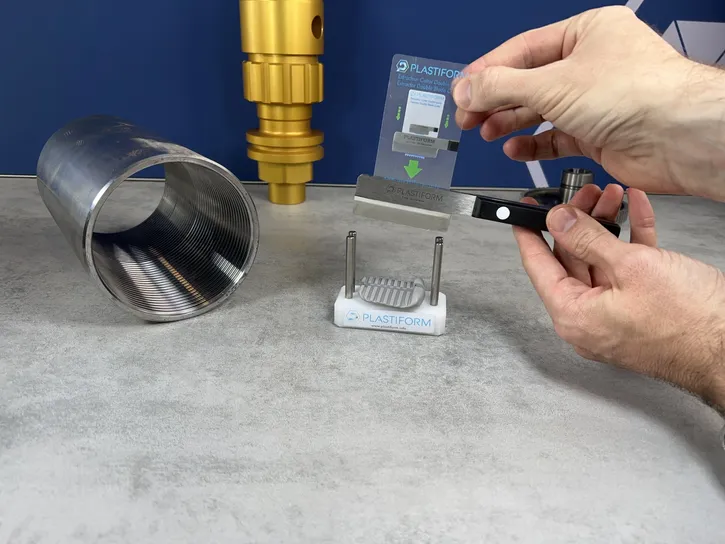
The Double Blade Cutter is a knife with two blades set 1 mm apart and a usable length of 60 mm. One pass cuts a thin slice with two parallel faces. When you lay the slice on the plate of a profile projector or a vision system, it shows a flat profile of the shape. You can then measure any dimension on it.
It comes with a cutting guide and an extraction card, and you will find it in every Plastiform case.
Which Impressions Can Be Sliced
An impression that is too soft deforms under the blades, and one that is too rigid cannot be cut. The technical sheet for each product tells you if it is compatible.
You can slice impressions made with F40, F50, F65, P25, P35, M25, M60, M70, and F50 XL. F20, F30 Visual, F30 Max, F85, P80 Ra, P51 SD, M90, F20 XL, F30 XL, and F85 XL are not compatible. M80 LP is potentially compatible, depending on the complexity of the impression.
Step by Step
The cutting guide prevents a skewed cut and gives you a parallel slice.
- Place the impression in the cutting guide with the surface of interest facing up.
- Align it so the cut is perpendicular to the shape.
- Cut in one clean pass. Do not saw.
- Lift the slice out with the extraction card, without deforming it.
- Lay the slice flat on the measuring plate.
Get a Cleaner Cut
With a Pasty product, compress the impression with a flat card when you apply it so the flat back sits better in the guide. A bad cut costs precision because the slice loses its parallelism or deforms.
Other Sizes
A cutler in France makes 100 mm and 200 mm cutters to order, with blade spacings from 0.5 mm to 3 mm. Contact Plastiform for an impression that the standard cutter cannot handle.
