Control Surface Roughness with Contact
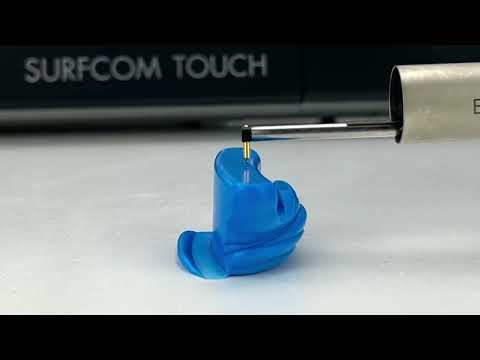
A contact roughness tester can measure Ra, Rz and other surface parameters from a rigid Plastiform replica.
The most common product for this application is the P80 Ra, a rigid pasty product that replicates surface condition specifically for indirect roughness controls.
When to Use P80 Ra
- The surface to inspect is inside a bore, groove, or other inaccessible area.
- You need a contact roughness measurement and the shape has zero removal constraint.
P80 Ra is a Rigid product. It cannot be extracted from undercuts, threads, or grooves without breaking. If the shape has any constraint, use a non-contact optical method instead.
Step-by-Step
- Degrease the surface with a validated degreaser and let it dry at air.
- Mount the cartridge with a standard nozzle. Do not use the Tip.
- Pour the product until the color is uniform after the product leaves the nozzle.
- Apply the product while keeping the nozzle in permanent contact with the surface. Use slight pressure so the material penetrates the surface properly.
- Compress with a flat card. A business card or the extraction card works well. Anything that can flatter the opposite side of the surface. This improves contact with the surface and creates a flat back for the roughness tester to perform better.
- Wait for polymerization. We recommend to wait at least 30 minutes after the product has harden before extracting the impression. This is required to the surface details to be rigid enough for the instrument palper.
- Extract straight out. Because there is no removal constraint, the impression should slide out easily.
- Measure with a roughness tester. Fix the impression to a flat base with a thin layer of adhesive wax or putty so it cannot move. During the measurement, make sure the temperature is similar to where the replica was made.
Verification
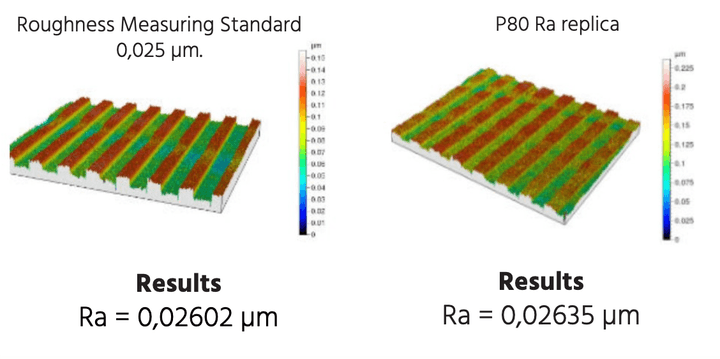
Independent tests by CETIM Laboratories have shown P80 Ra replicas match original surfaces within microns.
For your own validation, compare the impression result with a measurement taken directly on a known reference surface.
Troubleshooting
| Problem | Likely Cause | Solution |
|---|---|---|
| Ra value is too low | Surface not fully polymerized or air trapped at the surface | Apply more pressure, compress with a flat card, and re-degrease the part properly. |
| Impression cracks on extraction | Removal constraint was underestimated | Recalculate the constraint and switch to a Flexible product with a non-contact method if there is no solution to extract the P80 Ra. |
| Stylus leaves scratches on the replica | Impression is not fully polymerized | Wait longer for the rigid product to reach full hardness : ~30min. |
| Measurement repeats poorly | Impression moves on the fixture | Fix it with a better adhesive wax or a dedicated holder to prevent the palper from making the impression slide. |
| Surface looks smeared or soft in spots | Grease or oil residue | Degrease again with validated degreaser and take a new impression |